Example scenario. A support adviser pauses before using an AI-suggested reply. It reads well but overlooks an exception to company policy. The manager needs to know when the adviser will stop and verify an answer, as well as whether they can use the tool.
Research and employer expectations
Microsoft’s 2026 Work Trend Index discusses human judgement and work design among knowledge workers who use AI. The World Economic Forum reports employer expectations for technology skills. Both offer context for defining role objectives.
A workplace example
For sales, define how to verify claims against their sources. For managers, define how to recognise exceptions and route decisions to the right person. Give each behaviour a sample task, an acceptance criterion and a human approval step where needed.
Move from job descriptions to decisions
“Uses AI effectively” tells employees little about what they must do or how they will be assessed. Map the decisions in the role first. Who receives the output? Which errors can be reversed? When is human approval required?
Microsoft’s 2026 Work Trend Index includes a survey of 20,000 knowledge workers using AI. That population does not represent every frontline role. Read it alongside the World Economic Forum’s employer expectations and define tasks that fit your workforce.
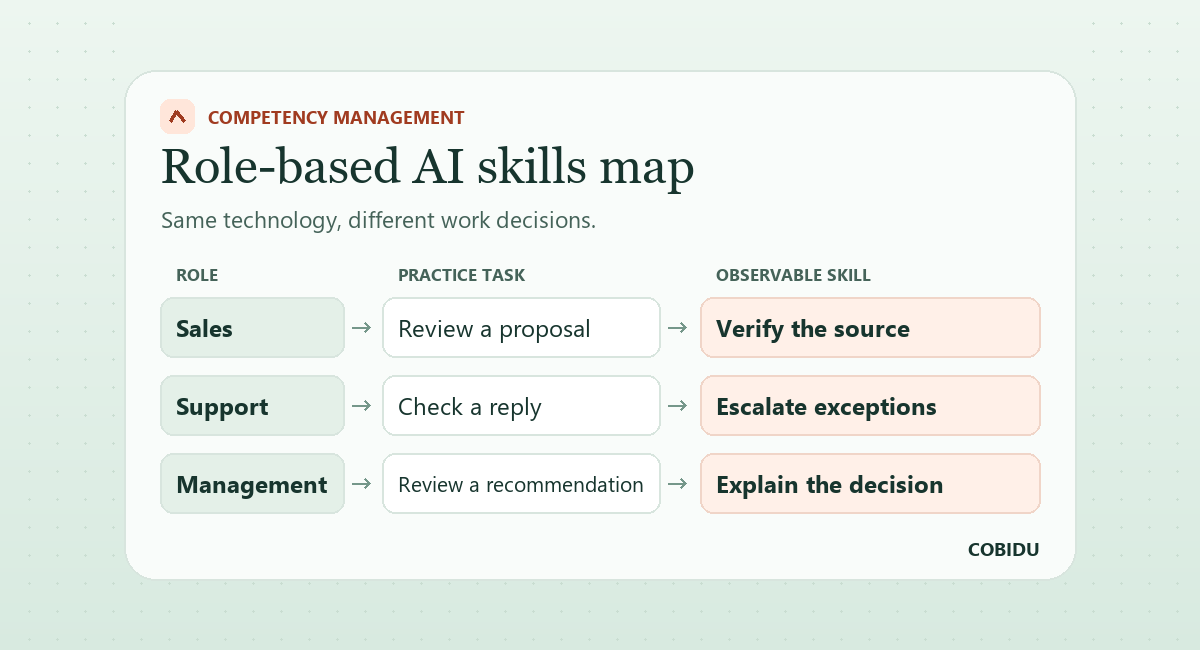
Sample skills map
| Role | Practice task | Observable behaviour |
|---|---|---|
| Sales adviser | Reviews a proposal draft | Verifies claims against their sources |
| Support adviser | Reviews a suggested reply | Recognises exceptions and escalates them |
| Team manager | Reviews an AI-assisted recommendation | Challenges assumptions and explains the decision |
- Map role decisions
- Describe observable behaviour
- Test it with a task
- Link it to a development plan
Observe proficiency in action
At a starting level, the employee uses a verification checklist. At the independent level, they identify which claims need checking. At an advanced level, they recognise exceptions and can review examples from peers. Use tasks of comparable difficulty at each level.
Review criteria with role owners when workflows, approval authority or tools change. If an objective refers to a task that employees no longer encounter, update the learning assignment and the evidence used to assess it.
Pilot the skills map
Start with two roles and two tasks per role. Put different mistakes in the example AI outputs. One can contain a wrong date, while another can propose something outside the company’s approval process. Look for an explanation and an appropriate verification step as well as detection of the mistake.
If results vary sharply within one team, check how closely the tasks match employees’ experience. A low score can reflect access, the example task or the workflow as well as a learning gap. Use the development conversation to identify which applies.
Turn a skills map into a learning plan
Identify two recurring decisions in one team. A support adviser might need to verify warranty eligibility and route an exception correctly. For each decision, give the employee an example to review and the manager a short observation task. Record the source the employee used as well as the decision they made.
After the assignment, check the same behaviour in a fresh example. If the employee cannot find the source, check access to process documentation. If they find it but misread it, add clearer examples to the development plan. The same low score can point to different interventions.
How to apply it with COBIDU
Define roles, levels and development needs in COBIDU Competency Management. Assign relevant learning in Platform and use AI Simulation for objectives involving conversations. Review the plan after three months and update criteria where the work has changed.
Some objectives call for an exercise. Others benefit from regular guidance by an experienced colleague. The next article explores how to match that need with a mentor.